
Learn English with Collins Definitions & Shanbei Sync
Overview
The Youdao Collins Chrome Extension is a productivity-focused browser tool designed to support language learners and professionals who frequently engage with English content online. It enables users to access detailed definitions from the Collins Dictionary directly through text selection, offering richer contextual understanding compared to standard dictionary entries. By integrating with the Shanbei flashcard system, it streamlines vocabulary acquisition by allowing users to save newly encountered words for future review. This integration supports long-term retention through spaced repetition principles, making it especially useful for students, educators, and self-learners aiming to expand their lexicon efficiently.
The extension operates within the Chrome browser environment, supporting cross-platform use across Windows, Mac, and Linux systems. It is particularly beneficial for users who read academic articles, technical documents, or online content in English and want immediate access to precise, context-aware definitions. The tool is built with a clear focus on enhancing comprehension and vocabulary retention, combining real-time translation with structured learning workflows. While the developer, oyyd, has not provided additional background information, the open-source nature of the project suggests transparency and community-driven development.
Key Features & Capabilities
- Multiple Translation Modes – Users can choose from several interaction methods: instant translation on hover, holding the Meta or Ctrl key while selecting text, or double-clicking to trigger translation. This flexibility accommodates different reading styles and workflow preferences.
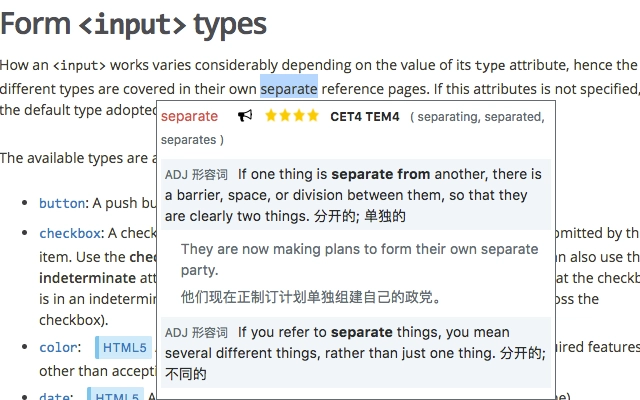
- Collins Dictionary Integration – Provides detailed, context-rich definitions from the Collins Dictionary, offering more than basic translations. This helps users understand how words are used in real English sentences, aiding deeper comprehension and memory retention.
- Shanbei Flashcard Sync – Selected words can be quickly added to a Shanbei account via OAuth authentication. This feature enables users to build a personalized vocabulary database for future review, aligning with proven language learning techniques.
- Quick Search via Shortcut – Pressing Ctrl+Q opens a floating panel for searching any word, allowing fast lookup without leaving the current page.
- Open-Source Transparency – The project is hosted on GitHub, enabling users to inspect the code, contribute, or verify functionality, which supports trust and long-term usability.
These features collectively create a seamless bridge between content consumption and active learning. For example, a user reading an article can instantly see a nuanced definition of a complex word, then save it to their Shanbei study list with one click. This workflow reduces friction in the learning process and encourages consistent engagement with new vocabulary.
User Interface, Workflow & Performance
The extension presents a clean, minimal interface focused on functionality. The floating panel triggered by Ctrl+Q appears in the top-right corner of the screen, displaying search results and options for saving words. The design prioritizes visibility and ease of access without overwhelming the user. Navigation is intuitive, relying on standard browser interaction patterns such as text selection and keyboard shortcuts.
Workflow efficiency is enhanced by the multiple activation methods, allowing users to adapt the tool to their reading pace and style. The performance is optimized for low-latency responses, ensuring quick access to definitions without noticeable delays during normal browsing. However, exact performance details such as CPU or RAM usage were not specified by the developer. Stability is expected to be consistent, given the extension’s lightweight nature and focus on core functionality. The extension does not appear to interfere with page rendering or browser responsiveness under typical use.
Compatibility & System Requirements
The Youdao Collins Chrome Extension is compatible with Windows, Mac, and Linux operating systems, ensuring broad accessibility across personal and professional environments. It is designed to run within the Google Chrome browser, with a file size of 1.5 MB, indicating a lightweight installation that minimizes storage impact. The software version is 1.0.0, released on March 15, 2024.
Exact system requirements were not listed by the developer. However, since it is a Chrome extension, it will function on any device that supports modern Chrome versions and has a stable internet connection. The extension does not require high-end hardware, making it suitable for older systems. Platform compatibility information is limited to the operating systems mentioned, and no additional dependencies were noted.
Pros and Cons
Pros
- Provides high-quality, context-aware definitions from Collins Dictionary
- Seamlessly integrates with Shanbei for flashcard-based vocabulary review
- Multiple activation methods for flexible user interaction
- Lightweight and fast, with minimal system impact
- Open-source with transparent development and community access
Cons
- Requires a Shanbei account for full functionality (OAuth login needed)
- Only available for Chrome browser, limiting cross-browser use
- No offline mode for dictionary lookup or flashcard access
- Performance under heavy multitasking was not specified
- Dependency on external services (Youdao, Collins, Shanbei) for data and sync
FAQ Section
Is the Youdao Collins Chrome Extension free to use?
Yes, the extension is available at no cost. It is distributed under a free license, with no hidden fees or subscription models.
What operating systems does the extension support?
The extension is compatible with Windows, Mac, and Linux systems, provided they are running the Google Chrome browser.
Do I need a Shanbei account to use the extension?
Yes, to save words to your flashcard system, you must have a Shanbei account. The extension uses OAuth to securely connect to your account.
Can I use the extension offline?
No, the extension requires an active internet connection to access dictionary data from Youdao and Collins, as well as to sync with the Shanbei platform.
How often is the extension updated?
The extension is versioned as 1.0.0, with the latest release on March 15, 2024. Updates are managed through the Chrome Web Store, and users are notified automatically when new versions are available.
Final Thoughts
The Youdao Collins Chrome Extension stands out as a focused, efficient tool for anyone serious about expanding their English vocabulary through real-world reading. Its integration of detailed dictionary definitions with a proven learning platform like Shanbei creates a powerful feedback loop between discovery and retention. The multiple activation methods and clean interface ensure smooth operation across different use cases, while the open-source nature adds credibility and long-term sustainability.
While its reliance on external services and browser-specific design limits some flexibility, the trade-offs are minimal compared to the benefits. For students, language learners, and professionals who read English content daily, this tool offers a practical, low-friction way to learn and remember new words. It transforms passive reading into an active learning experience.
Download Youdao Collins Chrome Extension now







